SOPs
TOTP: How the One-Time Code System Works
The one-picture version
Section titled “The one-picture version”OpenAI, Google, GitHub — the "Connect your authenticator app" dialog
a QR code or a text string ("Trouble scanning" / "Copy code").
Same secret. The QR is just the text wearing a picture.
Best: click Copy code and grab the text.
Or: screenshot the full QR and run
zbarimg on it.
The name is the parameter path:
/totp/<Issuer>/<user>.The seed is the SecureString value stored at that path.
Name = how I find it later. Seed = what I find.
HMAC-SHA1(seed, floor(now / 30)) → 6 digits.The service runs the same math with the same seed — that is the whole trick.
Both sides share the seed once, at setup. After that nothing is ever transmitted: my machine and their server each hash the seed against the clock every 30 seconds and independently arrive at the same 6 digits.
The QR code is just the secret
Section titled “The QR code is just the secret”Decode any setup QR and you get an otpauth:// URL:
otpauth://totp/OpenAI:ojhurst@gmail.com?secret=BASE32SEEDGOESHERE&issuer=OpenAIEverything is right there: the issuer, the account, and secret= — the seed itself. The two views of the same dialog prove it:
| The QR costume | The text costume |
|---|---|
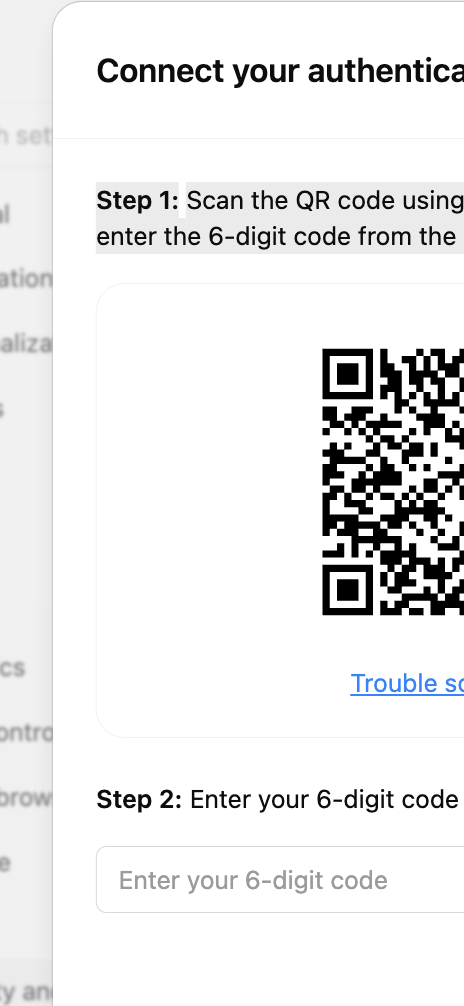 | 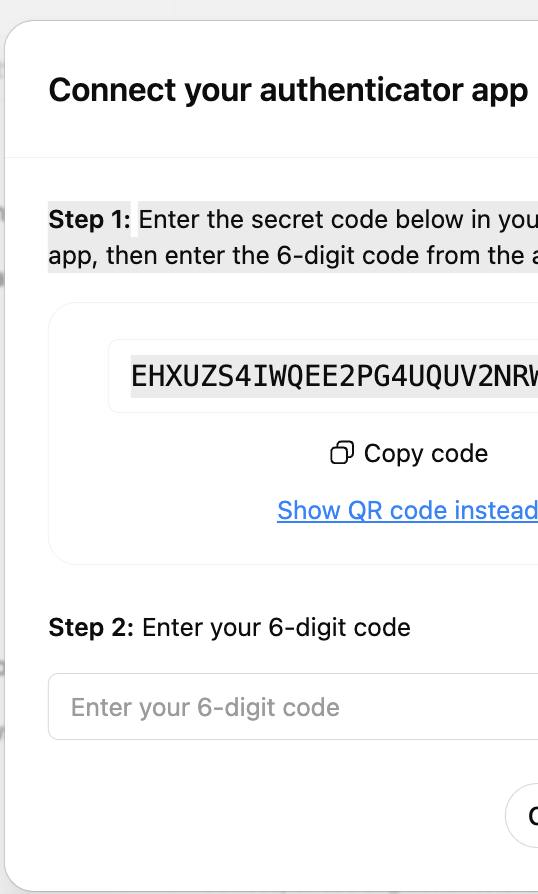 |
So on the way in — while enrolling — I never need a phone. Click “Trouble scanning” or “Copy code” to get the raw secret, or decode the QR locally:
zbarimg --raw -q screenshot-of-qr.pngWhich part goes up to AWS
Section titled “Which part goes up to AWS”Two things, packed into one parameter: the name and the seed. The name (issuer + account) becomes the parameter path — that is how I find it next time. The seed becomes the SecureString value stored at that path — that is what I find. Both come straight out of the otpauth:// URL: issuer and the account label form the path, secret= is the value.
| Artifact | Goes to AWS? | Why |
|---|---|---|
| QR code image | No | It IS the seed in costume. Decode it, then delete the screenshot. |
otpauth:// URL | No | Contains everything as one string. Split it: name → path, secret → value, discard the rest. |
| The name (issuer + account) | Yes — as the parameter path | /totp/OpenAI/ojhurst-at-gmail.com. Without it the seed is an anonymous string I can never match to a login. |
| The seed (base32 string) | Yes — as the SecureString value | The one durable secret. Everything regenerates from it, forever. |
| 6-digit codes | No | Derived on demand, worthless after 30 seconds. Storing one is storing a puff of smoke. |
Storage convention — one parameter per account, SecureString:
aws ssm put-parameter --name "/totp/OpenAI/ojhurst-at-gmail.com" \ --value "$SEED" --type SecureString --overwrite --profile claude-creds-writerRead one back (never echo it to a transcript):
SEED=$(~/apps/cc/bin/aws-secret /totp/OpenAI/ojhurst-at-gmail.com)List what exists:
aws ssm get-parameters-by-path --path /totp --recursive \ --profile claude-creds-reader --query 'Parameters[].Name' --output textTurning the seed into codes
Section titled “Turning the seed into codes”The generator lives in ~/apps/agent-totp/:
~/apps/cc/bin/aws-secret /totp/OpenAI/ojhurst-at-gmail.com | \ python3 ~/apps/agent-totp/generate-code.py --remaining--remaining shows how many seconds until the code rolls over — useful when an automation needs the code to survive a form submit. The math is three lines of standard library; pyotp just wraps it. Any machine with the seed and a correct clock produces correct codes.
Google Authenticator bulk export
Section titled “Google Authenticator bulk export”The phone app holds nothing magic — just a list of seeds. “Transfer accounts → Export accounts” packs them into QR codes, roughly 10 accounts per page (“1 of 2”, “2 of 2”). Each page is a protobuf blob containing every account’s name, issuer, and seed.
python3 ~/apps/agent-totp/decode-export.py page1.png page2.pngThat outputs JSON with every seed, ready to store at /totp/<Issuer>/<user>. decode-export.py handles both the protobuf export format and plain otpauth:// setup QRs. Full walkthrough: the README in ~/apps/agent-totp/.
Gotchas
Section titled “Gotchas”- The setup dialog mints a fresh secret every time it opens. Enroll with the last secret shown, not one screenshotted earlier. Precedent: 2026-08-28, re-enrolling OpenAI — the QR screenshotted at 2:28 PM and the text view at 2:59 PM were two different secrets. The first was already dead.
- Cropped screenshots do not decode.
zbarimgneeds the complete QR square. A half-QR is unrecoverable. - QR screenshots are secrets. Once the seed is decoded and stored, delete the screenshot — it holds the same seed in scannable form.
- Codes depend on the clock. A machine minutes off NTP generates wrong codes that look right.
Related
Section titled “Related”- Generator + decoder repo:
~/apps/agent-totp/(its README is the operational setup SOP) - Handling Secrets — the general rules for keeping values out of transcripts and git
- Parameter Store read/write helpers:
~/apps/cc/bin/aws-secret,~/apps/cc/bin/ask-secret-aws.sh