Capabilities
Auto Screenshot Renamer
What it does
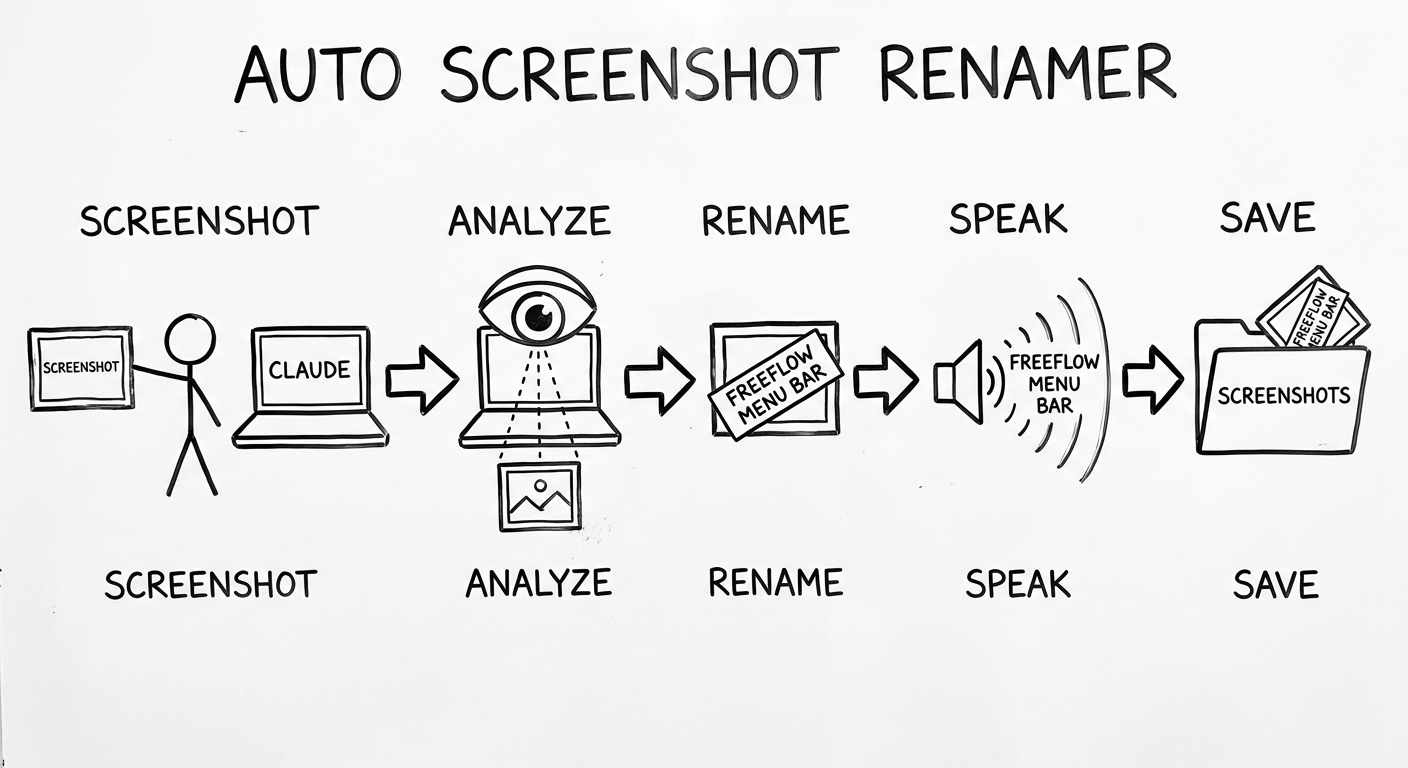
Section titled “What it does”Every time a prompt with a clipboard PNG lands in Claude Code, the screenshot moves through five stages and ends up as a self-describing file on disk.
- Screenshot. A
UserPromptSubmithook (capture.sh) reads the macOS clipboard. If a PNG is there, it gets saved to~/apps/auto-screenshot-renamer/screenshots/today/with a raw timestamp name. SSH-aware: if Claude is running on the Studio over SSH, the hook reverse-SSHes back to the client to read its clipboard. - Analyze. The capture step fires
rename.pyin the background. It feeds the image toclaude -pwith a vision prompt asking for a 4–8 word kebab-case description. - Rename. The file gets renamed to
<description>-<natural-date>.png(e.g.,freeflow-menu-bar-April-22-2026.png). Date format follows the global memory rule:April-22-2026, not2026-04-22. - Speak.
announce_rename()callsspeak-screen.pywith a phrase like “I just got your freeflow menu bar screenshot.” Voice routes through SSH to the client machine if Claude is running remotely. Voice-muted state is respected. - Save. The renamed file stays put in the screenshots folder. Nothing else moves; the rename is the destination.
The point: a week from now, when James needs the FreeFlow menu bar screenshot, he is not scrolling through hundreds of timestamp-indistinguishable files. The file name tells him what is in it.
When to use
Section titled “When to use”Passive on capture. The hook fires automatically on every UserPromptSubmit that has a clipboard PNG. There is no manual invocation for new screenshots.
Active for backfill. When the existing pile of timestamp-named files needs cleaning up, run the /rename-screenshots skill or backfill.py directly. Backfill always proposes the renames first and waits for --execute before doing anything.
How to invoke
Section titled “How to invoke”New screenshots — nothing. Drop an image on the clipboard, send a prompt, the file lands renamed.
Backfill the existing pile (dry-run first):
cd ~/apps/auto-screenshot-renamerpython3 backfill.py # propose renamespython3 backfill.py --execute # do themRename a single file manually:
python3 rename.py screenshots/today/2026-04-22_15-00-21.pngPrerequisites
Section titled “Prerequisites”- macOS for
osascript-based clipboard reads. claude -pavailable and authed against the Max plan. Per the global SUPER_CLAUDE.md, paid Anthropic API calls are off the table for automation; vision goes through the CLI.- The hook path
~/apps/auto-screenshot-renamer/capture.shregistered in~/.claude/settings.jsonunderhooks.UserPromptSubmit. - Optional: passwordless reverse-SSH from the Studio back to the MacBook Pro (and vice versa) if SSH-aware capture and voice are wanted.
Where it lives
Section titled “Where it lives”- Repo:
~/apps/auto-screenshot-renamer/ - Capture hook:
capture.sh(registered in~/.claude/settings.json) - Worker:
rename.py— handles a single file, called from the hook async - Backfill tool:
backfill.py— dry-run by default,--executeto commit - Screenshot pile:
screenshots/today/(live),screenshots/2026/...(archived) - Logs:
logs/capture-trace.log,logs/rename.log - Skill:
/rename-screenshots(auto-invokes on phrases like “rename my screenshots”, “clean up the screenshot folder”)
What it catches
Section titled “What it catches”- macOS screenshots from
Cmd-Shift-4orCmd-Shift-5configured to copy to clipboard - Images copied from a browser, Finder, or any native app via
Cmd-C - Anything on the clipboard at
UserPromptSubmittime, even when not referenced in the prompt text - Pastes from a remote machine when Claude is running over SSH (the hook queries the client clipboard, not the server’s)
What it does NOT catch
Section titled “What it does NOT catch”- Drag-and-drop file attachments into the Claude Code chat pane — those bypass the system clipboard entirely. This is the #1 silent-failure mode and the reason the
working-over-sshSOP flags the auto-renamer as “partial” status. - File-picker attachments via the paperclip icon — also bypass the clipboard.
- Inline markdown image URLs — those are URL references, not image data.
- TIFF clipboard content — currently PNG-only.
Output naming
Section titled “Output naming”- Filename shape:
<kebab-case-description>-<natural-date>.png - Description: 4–8 words, kebab-case, no punctuation, no extension. Prefer app names or dialog titles when visible (
slack-dm-with-wayne,ghl-calendar-force-book-modal). - Date format:
April-22-2026, not2026-04-22(global memory rule). - Spoken form: the date is dropped from the spoken phrase. Voice says “I just got your freeflow menu bar screenshot.” — no date noise when listening.
Never destroys data
Section titled “Never destroys data”- If
claude -pfails or returns garbage, the file keeps its timestamp name and the failure goes inlogs/rename.log. Nothing gets deleted. - Renames are
mv, neverrm+ write. - If a proposed slug collides with an existing file, a suffix is appended (
-2,-3, etc.). - Backfill never runs without an explicit
--executeflag.
Known gaps
Section titled “Known gaps”- Drag-and-drop bypass. The biggest hole. Images dragged into the VS Code chat panel never hit the system clipboard, so the hook sees nothing. Tracked in the Working Over SSH SOP as a partial-status channel.
- Dedup by content hash. Phase 2 work — currently the same image pasted twice produces two files.
- Smart grouping into project subfolders. Phase 2 — the slug already contains enough info to route to
screenshots/freeflow/automatically. - Bug detection. Phase 3 — surface screenshots whose slug contains
error,crash, orfailedin the daily reflection email. - Cross-machine sync. Each machine has its own pile. A propagation step would make every renamed screenshot appear identically on every machine.
How to update this page
Section titled “How to update this page”- If the storage path changes, update “Where it lives” and the example commands.
- If the spoken phrase format changes, update the Output naming section’s “Spoken form” line.
- If a phase from “Known gaps” lands, move it out and into the relevant body section.
Related
Section titled “Related”- Clipboard Image Archive — the predecessor pattern this capability replaced. The archive saved everything; this version names everything.
- Working Over SSH — captures the partial-status nature of this capability when running over SSH, plus the broader audit of what breaks when Claude is on the other machine.
- Repo entry: auto-screenshot-renamer in the Repos page.
~/apps/auto-screenshot-renamer/vision.md— the why, the non-negotiables, and the phase plan.