Agency AI Access Model
The diagram
Section titled “The diagram”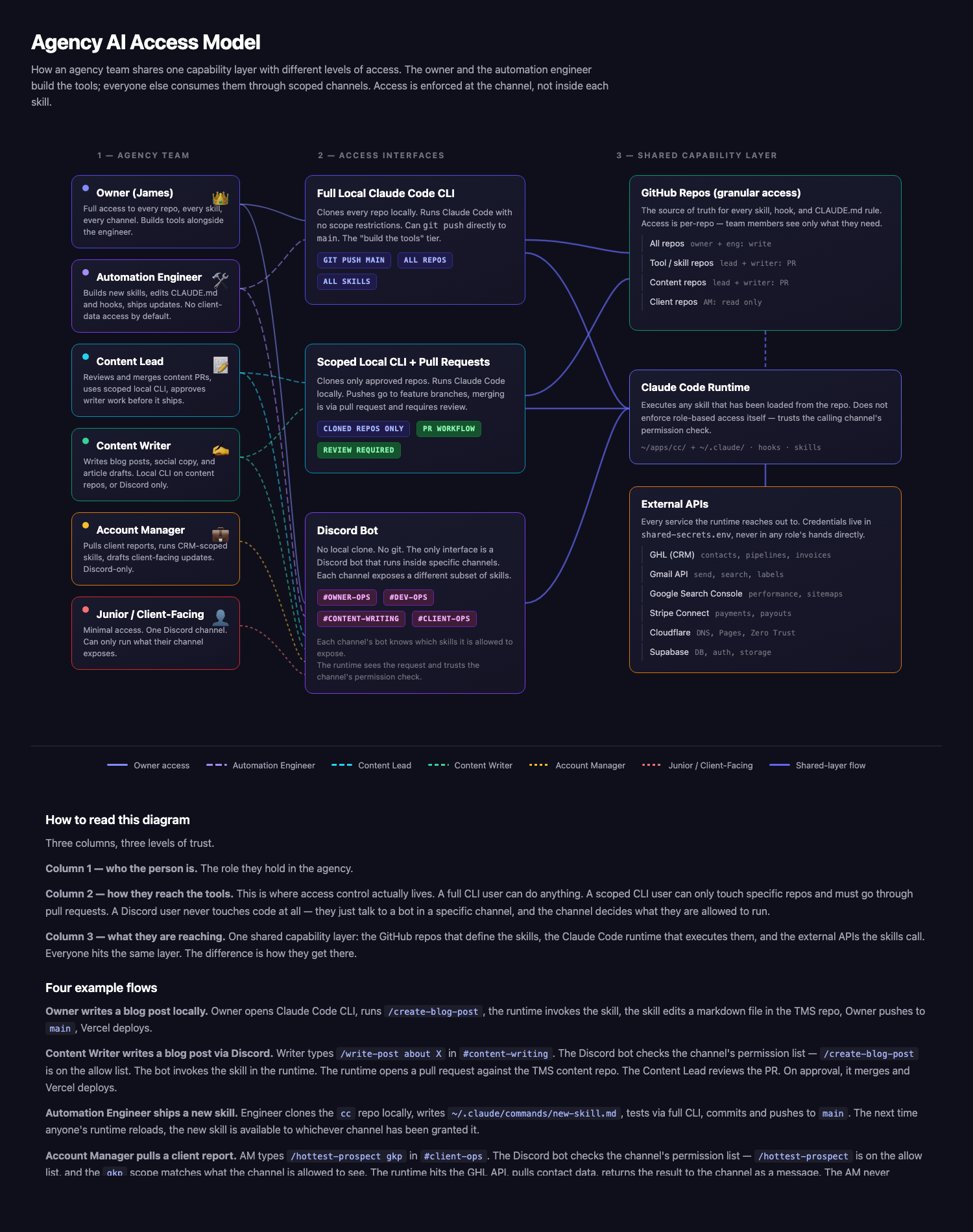
Open the full diagram in its own page →
The idea in one sentence
Section titled “The idea in one sentence”The Automation Engineer builds the skills. Everyone else consumes them through a channel that is scoped to what they are allowed to do. Access control is enforced at the channel, not inside each skill.
The three layers
Section titled “The three layers”1. Agency Team (six roles)
Section titled “1. Agency Team (six roles)”| Role | What they do |
|---|---|
| Owner (James) | Full access to every repo, every skill, every channel. Can do anything. |
| Automation Engineer | Builds new skills, edits CLAUDE.md and hooks, ships updates. No client-data access by default. |
| Content Lead | Reviews and merges content PRs. Uses scoped local CLI. Gatekeeper on what gets published. |
| Content Writer | Writes blog posts, social copy, article drafts. Local CLI on content repos, or Discord-only. |
| Account Manager | Pulls client reports, runs CRM-scoped skills, drafts client-facing updates. Discord-only. |
| Junior / Client-Facing | Minimal access. One Discord channel. Can only run what their channel exposes. |
2. Access Interfaces (where scope is enforced)
Section titled “2. Access Interfaces (where scope is enforced)”| Interface | What it looks like | Who uses it |
|---|---|---|
| Full Local CLI | Clones every repo, runs Claude Code with no restrictions, pushes directly to main. | Owner, Automation Engineer |
| Scoped Local CLI + PRs | Clones only approved repos. Pushes go to feature branches. Merging requires pull request review. | Content Lead, Content Writer (power users) |
| Discord Bot | No local clone, no git, no CLI. Just a bot in specific Discord channels. Each channel exposes a different subset of skills. | Everyone, depending on what channels they are in |
3. Shared Capability Layer (the same for everyone)
Section titled “3. Shared Capability Layer (the same for everyone)”| Component | What it holds |
|---|---|
| GitHub Repos | The source of truth for every skill, hook, and CLAUDE.md rule. |
| Claude Code Runtime | Executes any skill loaded from the repo. Does not enforce role-based access itself — it trusts the calling channel’s permission check. |
| External APIs | GHL, Gmail, GSC, Stripe, Cloudflare, Supabase. Credentials live in shared-secrets.env, never in any role’s hands directly. |
Example flows
Section titled “Example flows”Owner writes a blog post locally
Section titled “Owner writes a blog post locally”- Owner opens Claude Code CLI.
- Runs
/create-blog-postwith raw content pasted in. - The runtime invokes the skill.
- The skill edits a markdown file in
~/apps/themarketingshow/content/. - Owner commits and pushes to
main. - Vercel auto-deploys.
Content Writer writes a blog post via Discord
Section titled “Content Writer writes a blog post via Discord”- Writer types
/write-post about Xin#content-writing. - The Discord bot checks the channel’s permission list.
/create-blog-postis on the allow list. - The bot invokes the skill in the runtime.
- The runtime opens a pull request against the TMS content repo.
- The Content Lead reviews the PR.
- On approval, the Lead merges and Vercel deploys.
Automation Engineer ships a new skill
Section titled “Automation Engineer ships a new skill”- Engineer clones the
ccrepo locally. - Writes
~/.claude/commands/new-skill.md. - Tests it via full local CLI.
- Commits and pushes to
main. - Next time anyone’s runtime reloads, the new skill is available to whichever channel has been granted it in the bot config.
Account Manager pulls a client report
Section titled “Account Manager pulls a client report”- AM types
/hottest-prospect gkpin#client-ops. - The Discord bot checks the channel’s permission list.
/hottest-prospectis on the allow list, and thegkpscope matches what the channel is allowed to see. - The runtime hits the GHL API, pulls contact data.
- Result returns to the channel as a message.
- AM never touches a repo, never sees credentials, never sees any client the channel is not scoped to.
What this protects against
Section titled “What this protects against”- Accidental pushes to main. A Discord-only user cannot do it because they have no git access.
- Token leakage. Credentials live in
shared-secrets.envon Google Drive and on the VPS. No role below Owner / Automation Engineer ever sees them directly. - Scope creep. A scoped CLI user cannot bypass the PR process, because
mainpush access is gated on the repo side. - Cross-client leakage. An Account Manager in
#client-opsfor client A cannot see client B’s data unless a channel for client B exists and they are invited to it. - Rogue skill execution. The Automation Engineer can write a new skill, but until someone grants a channel the right to invoke it, no non-Owner can run it.
Open questions (things to decide before building this for real)
Section titled “Open questions (things to decide before building this for real)”- Where does the Discord bot run? VPS. Which runtime — Node, Python, or a managed service like
discord.py+ a systemd unit? - How are channel permissions stored? Probably a YAML file in the
ccrepo: channel name → allowed skills list. Bot reads on startup, hot-reloads on file change. - How are scopes passed to skills? The bot adds a
--scope=<channel>argument when invoking a skill. Skills that touch client data read the scope and filter. - How is the audit trail logged? Every bot invocation writes a structured row (
channel,user,skill,args,outcome) to a per-bot append-only log on the VPS, rotated nightly. - What if a skill wants to run for multiple clients? Only the Owner’s channel can invoke the “all clients” variant. Scoped channels always pass their single-client scope.
- What if the GitHub repo splits? Over time, moving tool/skill repos to a separate org from content repos would make the access model cleaner — no more “clone this one subdirectory only.”
Why this matters
Section titled “Why this matters”Today, every agency I know is either (a) giving everyone full access and praying, or (b) blocking everyone from using AI at all because they are afraid of what will happen. Neither is the answer. The answer is scoping access at the interface level, not inside the AI itself — trust the bot, not the LLM.